Get started · How-to
Quick start: connect your first device
From your new workspace to live telemetry in about ten minutes, using the Get started wizard.
Updated 11 Nov 20262 min read
All ThingsX IoT Core pages
- What ThingsX IoT Core does
- Quick start: connect your first device
- Key concepts
- Security and access
- Connect Wi-Fi and IoT devices
- BLE gateways, shelf labels and child devices
- LoRaWAN sensors and gateways
- Industrial I/O modules
- Device twins and state
- Send commands to devices
- Rules: react to device messages
- SDK and REST API
- Monitor your fleet and support customers
- Moving from another IoT platform
- From AWS IoT Core
- From Azure IoT Hub and other platforms
- Device can't connect
- Devices keep disconnecting or reconnecting
- Data isn't arriving or a rule doesn't fire
- Frequently asked questions
- Topics and limits reference
Before you start
- A ThingsX IoT Core workspace. Sign up and we send you the console address and your workspace endpoint.
- A device or a laptop that can run an MQTT client (Python with
paho-mqttis used below).
1. Open Get started
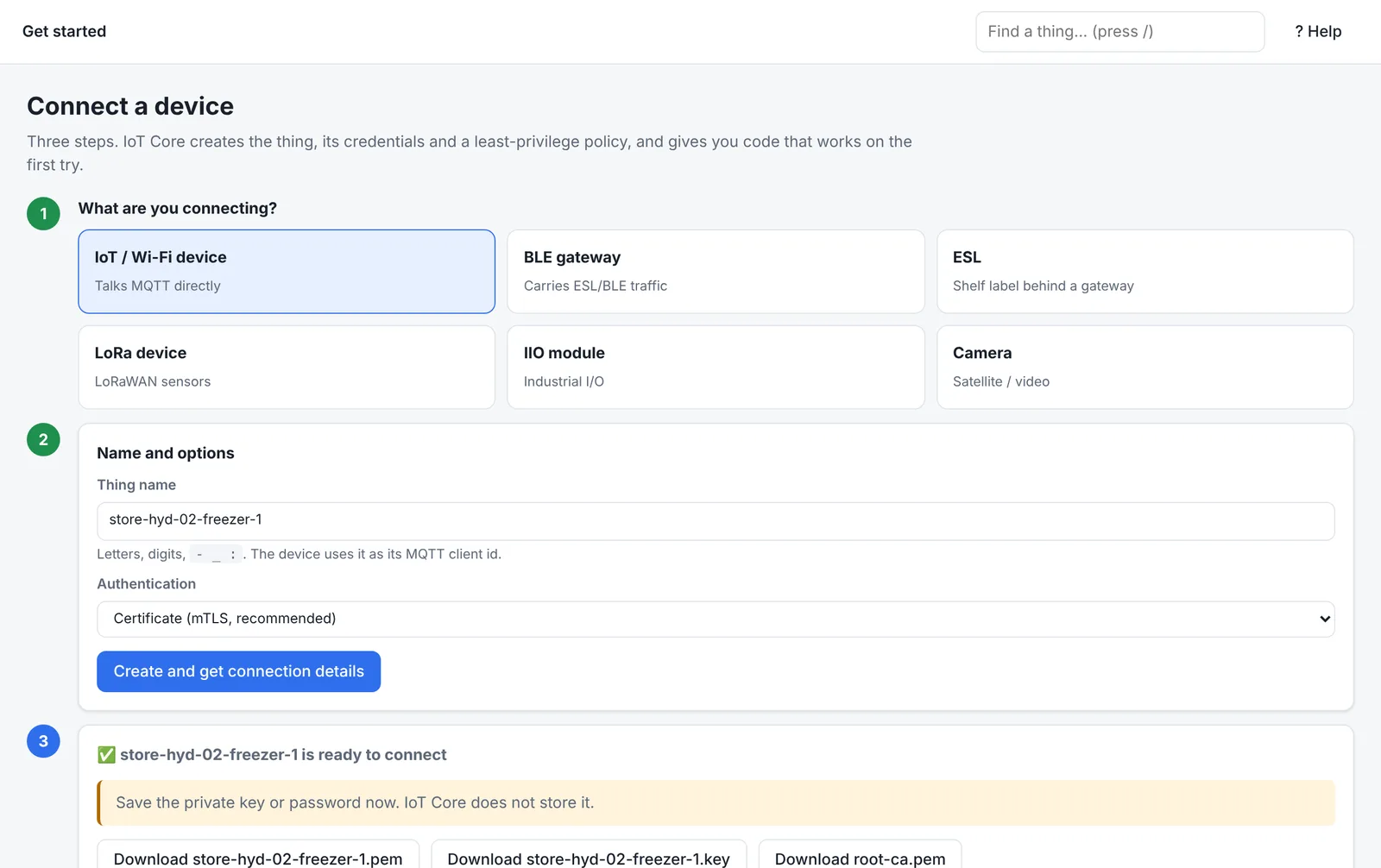
In the console, open Get started (or press Connect a device on the Things page). Pick what you are connecting: IoT / Wi-Fi device, BLE gateway, ESL, LoRa device, IIO module or Camera.
2. Name it and choose how it signs in
Give it a name, such as store-hyd-01-freezer-1. The device uses this name as its MQTT client ID, so keep it unique. Choose Certificate (mTLS, recommended) or Password.
Press Create and get connection details. IoT Core creates, in one step:
- 1The thingregistry entry with its family
- 2Its certificate or passwordprivate key shown once
- 3A least-privilege policyonly its own topics
- 4Ready-to-run codeendpoint and topics filled in
3. Connect and send a reading
import json, ssl, time
import paho.mqtt.client as mqtt

NAME = "store-hyd-01-freezer-1"
c = mqtt.Client(client_id=NAME, protocol=mqtt.MQTTv311)
c.tls_set(ca_certs="root-ca.pem", certfile=f"{NAME}.pem", keyfile=f"{NAME}.key")
c.connect("<your-endpoint>", 8883)
c.loop_start()
while True:
    c.publish(f"tic/things/{NAME}/telemetry", json.dumps({"temperature": -19.4, "humidity": 61}), qos=1)
time.sleep(60)4. See it in the console
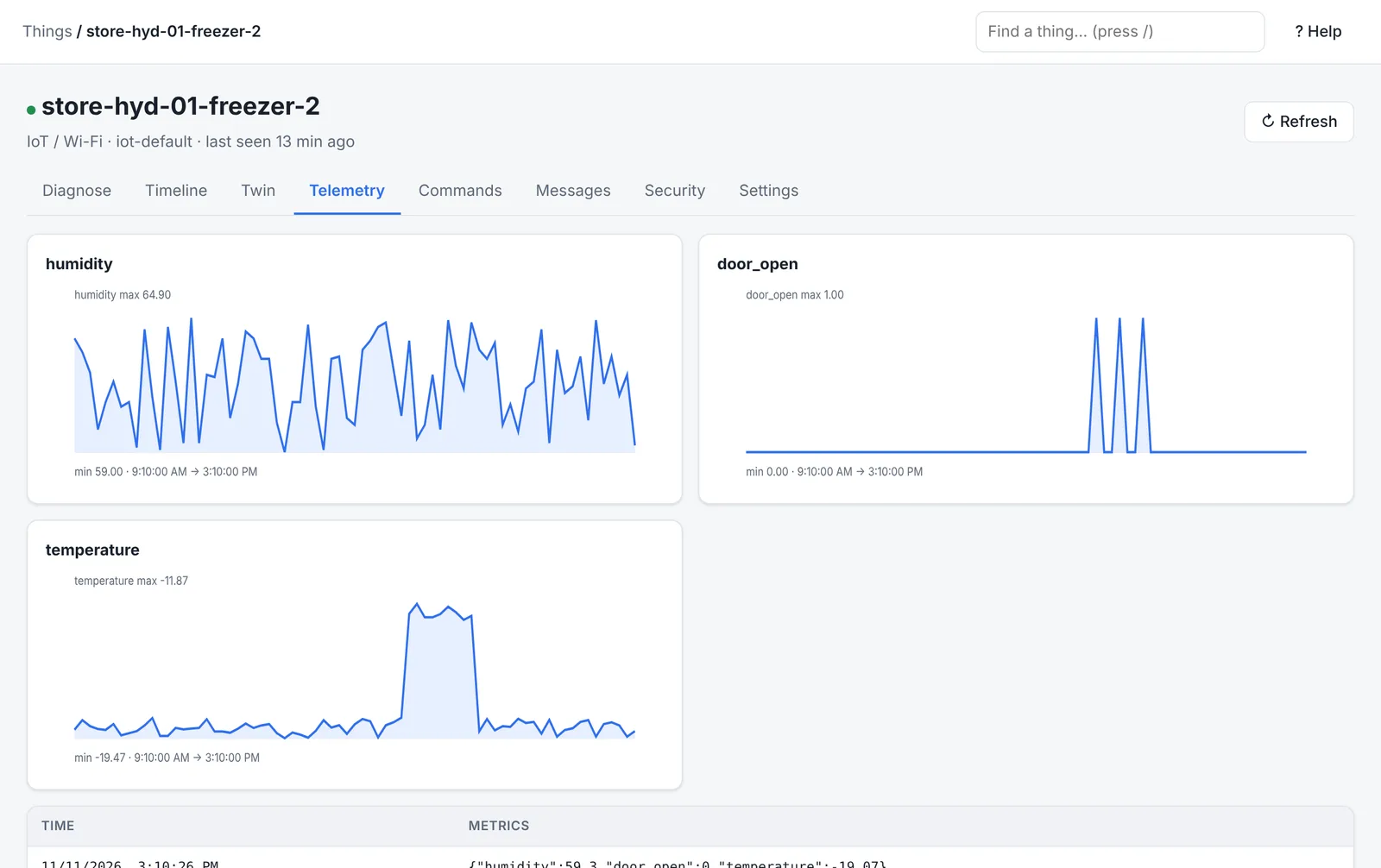
Open Things → your device. The dot turns green when it is connected; Telemetry charts each numeric field you send; Timeline shows the connection and every message.
Next
- Connect Wi-Fi and IoT devices for topics, commands and twins
- Write a rule to alert when a freezer gets warm
Was this page helpful?
Can't find what you need? Contact support or read about ThingsX IoT Core.