ThingsX IoT Core
One device cloud for every kind of device, with LoRaWAN built in.

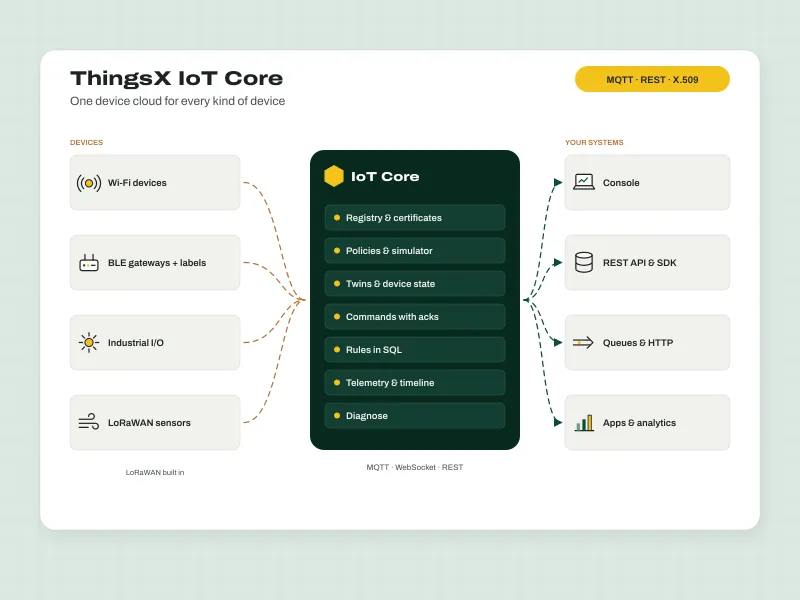
ThingsX IoT Core connects your devices securely, keeps track of every one of them and gets their data to your applications. Wi-Fi devices, in-store gateways with the shelf labels and sensors behind them, industrial I/O and LoRaWAN sensors live in one registry, with the same certificates, policies, twins, commands and rules. It is built for the people who keep fleets running. Every refused connection and denied message carries a reason, every device has a Diagnose tab with a health score and the fix in plain words, and support finds any device and copies a ticket-ready summary in one search. Moving from AWS, Azure or your own MQTT server is a mapping exercise, and devices keep their certificates. Use it as a managed service or in your own cloud.
What it does
- One registry for Wi-Fi devices, gateway children, industrial I/O and LoRaWAN
- X.509 certificates or passwords over TLS; private keys shown once, never stored
- Least-privilege JSON policies, with a simulator
- Device twins with desired and reported state and the delta
- Commands that are stored, retried and acknowledged
- Rules in SQL with a test bench and replayable failures
- Diagnose, timeline and event log: a reason for every refusal
- IT support and customer lookup pages for your support team
Used for
- Moving a fleet off a cloud IoT service or your own MQTT server
- LoRaWAN sensor networks across large sites
- Cold-chain and facility monitoring across many stores
- Retail IoT with ThingsX gateways and labels
How it works
From first device to fixed problem
- 1
Connect a device
Get started creates the thing, its certificate or password, a least-privilege policy and ready-to-run code.
- 2
Messages flow in
Telemetry, events and twin updates over MQTT or WebSocket, from devices, gateways and LoRaWAN sensors.
- 3
Rules act on them
Filter with SQL; republish, call your API, queue, update a twin or send a command.
- 4
Your apps use the data
REST API, SDK and webhooks, with the same names your team already knows.
- 5
Support fixes problems fast
Diagnose, timelines and reasons for every refusal; issues open and close by themselves.
Inside the console
Built for the people who fix things
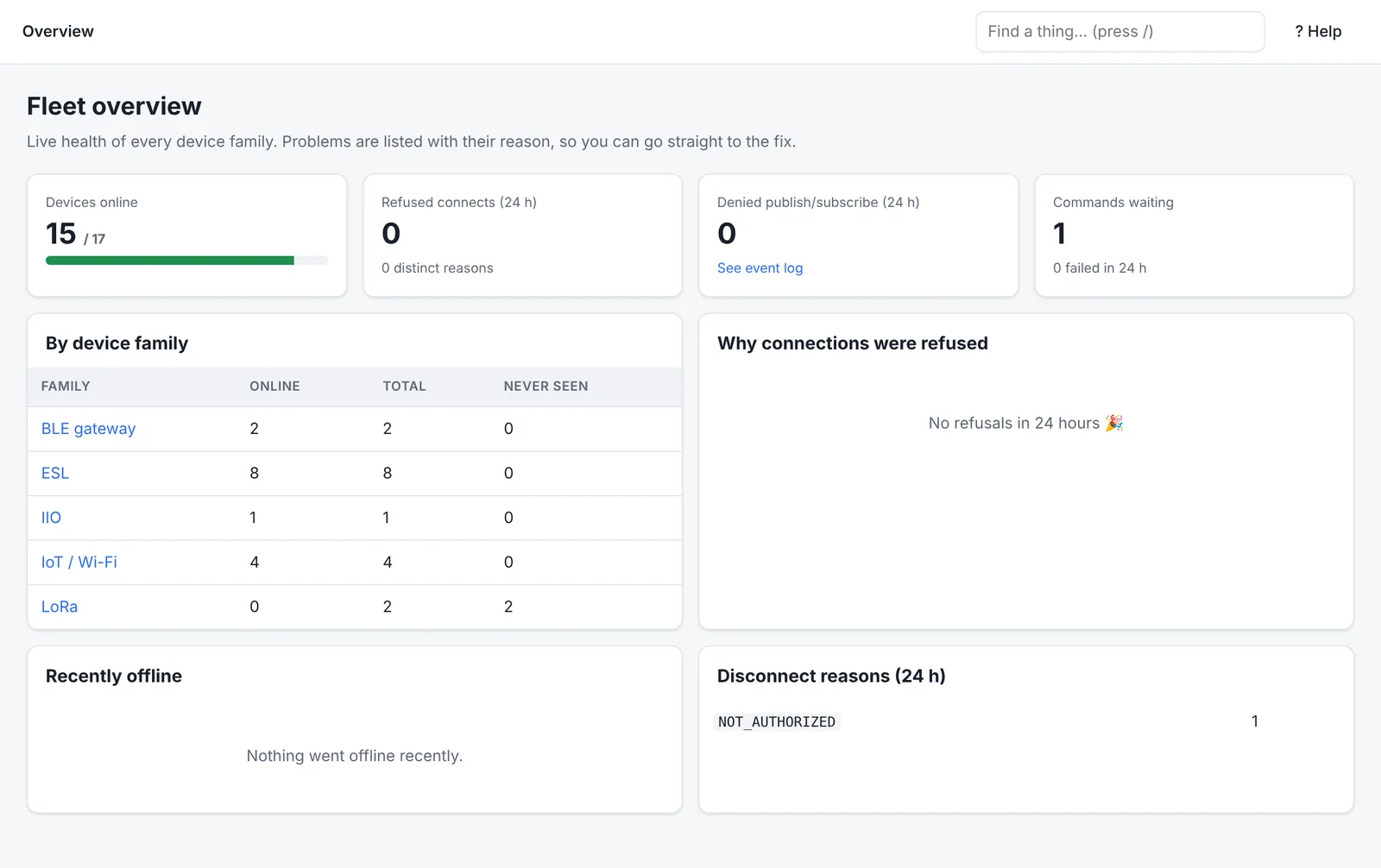
Real screens with demo devices. Pick one to see it larger.
Help & docs
Set it up, move to it, fix it
Guides written by the team that builds and supports ThingsX IoT Core.
All ThingsX IoT Core docs →- Get startedWhat ThingsX IoT Core doesOne device cloud for Wi-Fi devices, BLE gateways with shelf labels, industrial I/O and LoRaWAN sensors, with a console built for fixing problems fast.
- Get startedQuick start: connect your first deviceFrom your new workspace to live telemetry in about ten minutes, using the Get started wizard.
- Set upConnect Wi-Fi and IoT devicesEndpoints, topics and message formats for devices that talk MQTT directly, including commands and twins.
- Set upBLE gateways, shelf labels and child devicesConnect a BLE gateway once, and track every shelf label or sensor behind it as its own device.
- Set upLoRaWAN sensors and gatewaysAdd LoRa sensors with their DevEUI and AppKey, point your gateways at your workspace, and use uplinks and downlinks like any other device.
- Set upIndustrial I/O modulesConnect PLC and I/O modules directly or behind a gateway, and use their readings in rules.
Already on a cloud IoT service?
Familiar concepts, so nothing is relearned or re-flashed
Whether you run on AWS, Azure or another platform today, the building blocks are the same. Here is where each one lives in ThingsX IoT Core.
| On your current platform | ThingsX IoT Core |
|---|---|
| Devices, device types and groups | Things, thing types and groups, with search |
| Device shadow or device twin | Twins, with desired and reported state |
| Access policies | JSON policies, with a simulator; existing policies imported |
| X.509 device certificates | Kept: pinned by fingerprint, no re-flashing |
| Jobs and cloud-to-device messages | Commands with an outbox and acknowledgements |
| Message routing rules | Rules in SQL, with a test bench |
| Serverless and queue integrations | HTTP and queue actions, republish |
| LoRaWAN, often a separate service | Built in, on the same registry and rules |
| Cloud SDK and REST calls | ThingsX SDK and REST API |
- 1ExportA read-only export of your devices, groups, policies, certificates and twin state from your current platform.
- 2ImportDry-run first, then import. Certificates are pinned, so devices are not re-flashed.
- 3Point devicesChange the endpoint and the server CA. Client IDs, keys, certificates and topics stay.
- 4Switch backendsMove your services to the ThingsX SDK or REST API. We map your existing calls with your team.
Sign up
Sign up for ThingsX IoT Core
Create a workspace and connect your first device in minutes, or ask us to plan a move from your current IoT platform.
Read the docsTell us who you are and what you'll use it for. We'll set up your access and send you the details.