How it works · Guide
Traceability and release readiness
The trace matrix, gaps and alerts, and how Tracewright decides a project is ready to release.
Updated 11 Nov 20261 min read
All Tracewright pages
- What Tracewright does
- Quick start: your first project
- Roles and who can do what
- How AI drafting works
- Review flows and electronic signatures
- Traceability and release readiness
- Add meetings, documents and emails
- Record meetings
- Review and approve records, day to day
- Checklists and review meetings
- Baselines and publishing
- Risk management
- Project memory, search and the assistant
- Administrators: first steps
- AI models and governance
- Jira and Polarion
- Microsoft 365, Teams and Outlook
- Alerts to Teams channels and webhooks
- Desktop app and browser extension
- Import from DOORS, Polarion, Jama and other tools
- Troubleshooting
- Frequently asked questions
- Modules
The trace matrix
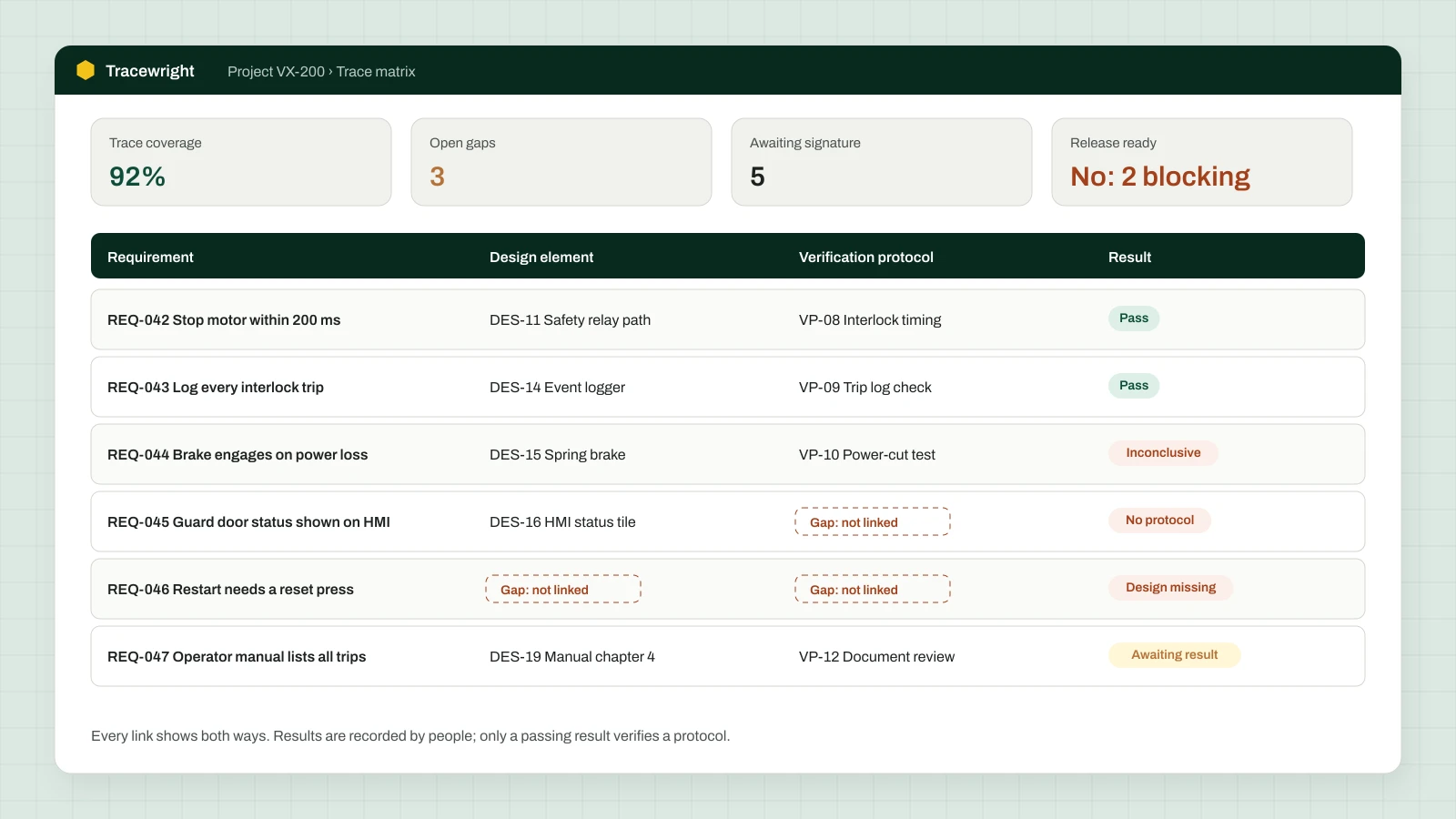
Project → Trace matrix shows each requirement with its design elements, verification protocols and results, both ways. Trace from any record kind lets you start from needs, protocols, results, components or failure modes and see what each depends on (upstream) and what depends on it (downstream).
Linking
- Link requirements to design elements (satisfied by or allocated to, at architecture or detailed-design level) and to verification protocols.
- Where design doesn't apply, record a non-applicability rationale a reviewer can review; "n/a" isn't accepted.
- Suggest design links and Draft design outline propose links for people to confirm.
Verification results
Record each executed test as a verification result linked from its protocol, with the outcome (pass, fail or inconclusive), date and measured values. Only people record outcomes. Only a passing result verifies a protocol; a failed or inconclusive result blocks release until it is dispositioned (re-test, deviation or design change). Results from a test tool can be imported as JUnit XML or CSV.
Gaps and alerts
A new gap always has an owner and a due date (by severity). Whoever raised a gap can't disposition it. Alerts cover missing protocols or design, stale approvals, overdue reviews and gaps, failed results and approvers unavailable. They appear on the dashboard, in notifications, by email and in a Teams channel or webhook if set, and close by themselves when the cause is fixed.
Release readiness
A project is release ready when every requirement in scope is traced to design and to a passing verification, nothing blocking is open, and no approval is stale. The Overview shows what blocks release and links to each item.
Was this page helpful?
Can't find what you need? Contact support or read about Tracewright.