Get started · How-to
Quick start: your first project
Start a design project in six steps, add your first meeting or document, and review the drafts it produces.
Updated 11 Nov 20262 min read
All Tracewright pages
- What Tracewright does
- Quick start: your first project
- Roles and who can do what
- How AI drafting works
- Review flows and electronic signatures
- Traceability and release readiness
- Add meetings, documents and emails
- Record meetings
- Review and approve records, day to day
- Checklists and review meetings
- Baselines and publishing
- Risk management
- Project memory, search and the assistant
- Administrators: first steps
- AI models and governance
- Jira and Polarion
- Microsoft 365, Teams and Outlook
- Alerts to Teams channels and webhooks
- Desktop app and browser extension
- Import from DOORS, Polarion, Jama and other tools
- Troubleshooting
- Frequently asked questions
- Modules
Before you start
- A Tracewright account with the Project lead role (or the Manage design-control projects permission).
- A first source: a meeting transcript, a recording, or a document such as a specification.
1. Start a design project
Projects → Start a design project walks you through six steps:
- Domain: pick the domain profile (for example Medical devices or Industrial machinery). It sets the words, record kinds, risk method and trace rules.
- Client and project: the client, a project code and name, and a short description.
- Product and purpose: what is being designed and what it is for (intended use, item definition or intended function, in your profile's words) and the life-cycle phase. Reviewers check requirements against this.
- Standards and classification: the standards the design controls answer to, the integrity level (such as a software safety class, ASIL, DAL, SIL or PL) and the data class.
- Team: authors, SMEs, approvers, document control and governance. You can't make yourself approver or governance.
- Review: check and create. The project opens on Sources with Add a source ready.
The product, the intended use and at least one standard are required. Leads can correct them later from Overview → Product and scope → Edit; every change is in the audit trail.
2. Add your first source
On Sources → Add a source: paste a transcript, upload a file (Word, PDF, PowerPoint, Excel, a saved Outlook email, or an audio or video recording), or import from Microsoft 365. For meetings, record how people were told it was recorded; that consent is kept with the transcript.
3. Review the drafts
Drafting proposes requirements, assumptions, decisions, actions, questions, gaps and hazards. Each draft shows the statements it cites.
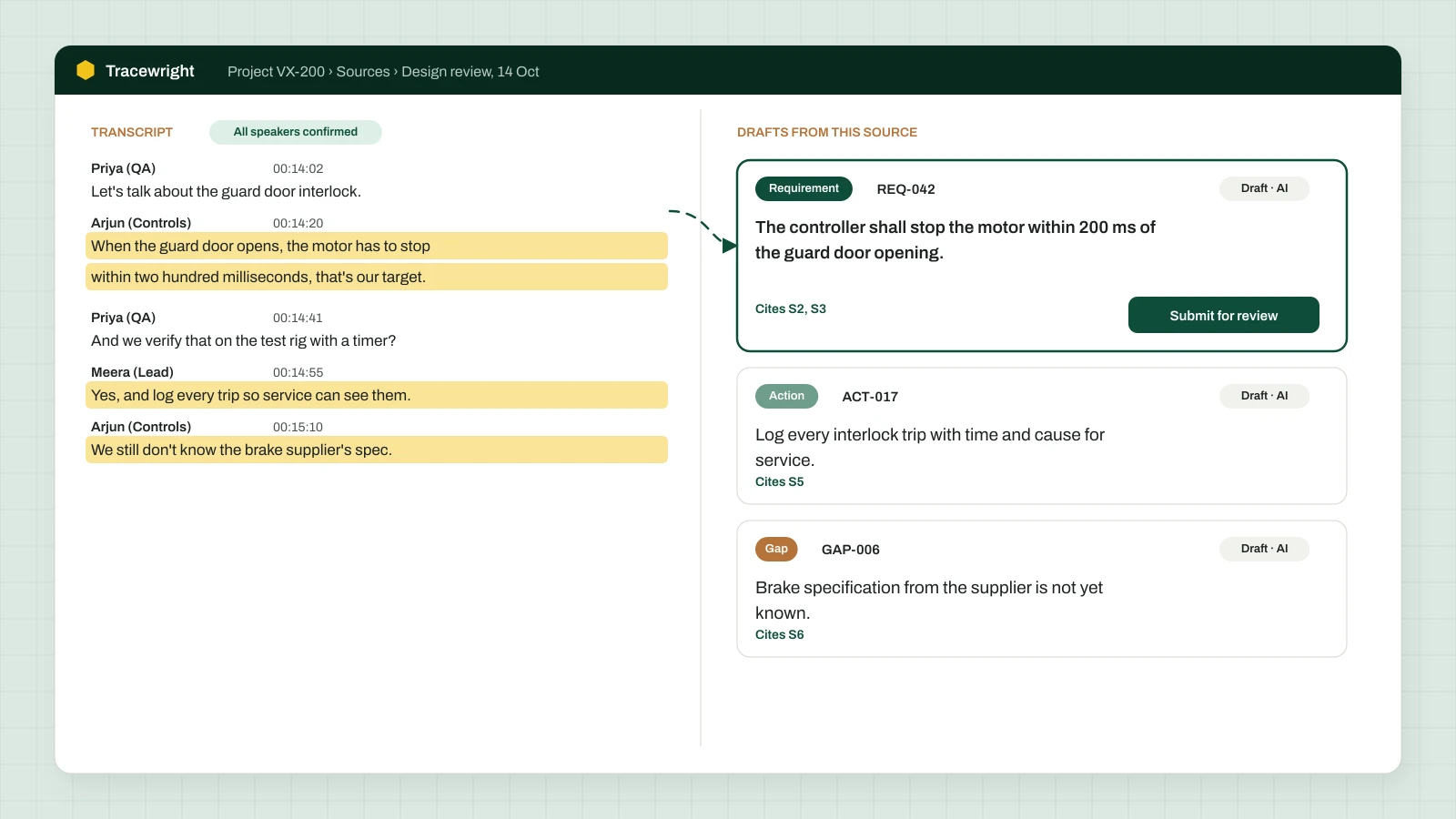
For each draft: check the citation against the source, fix the wording in a new revision (say what changed), then Submit it for review, naming the SMEs who will review it.
4. Watch it move
Your Dashboard and My queue show what is waiting on whom. The project's Board shows records by review step; the Trace matrix shows what is linked and what is missing.
Next
Was this page helpful?
Can't find what you need? Contact support or read about Tracewright.