Tracewright
Meetings and documents become signed, traced design records. Agents draft; people decide.
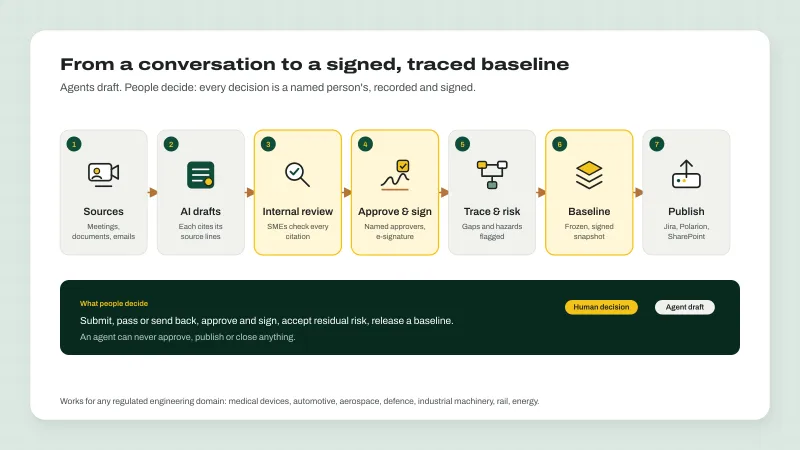
Tracewright is design controls and traceability for regulated engineering teams. It takes what your team already produces, from design reviews and client meetings to specifications and emails, and drafts requirements, decisions, actions, gaps and hazards, each citing the exact statements it came from. People stay in charge. Named experts review every draft, approvers sign with an electronic signature, and an agent never approves, publishes or closes anything. The trace matrix shows what is linked and what is missing, alerts close by themselves when the cause is fixed, and approved records are released as signed baselines to Jira, Polarion or SharePoint. Domain profiles fit medical devices, automotive, aerospace, defence, industrial machinery, rail and energy, and it runs as a managed service or on your own premises.
What it does
- AI drafts from meetings and documents, each citing its sources
- Record in the browser, with a browser extension or the desktop app
- Named reviewers, review flows and electronic signatures
- Trace matrix with gaps, alerts and release readiness
- Risk management with signed residual-risk acceptance
- Signed baselines published to Jira, Polarion or SharePoint
- Import from ReqIF or CSV, and test results from JUnit
- Works without AI; you govern providers, data classes and budgets
Used for
- Medical device design controls and design history
- Requirement traceability for automotive, aerospace and defence
- Machinery safety requirements and risk files
- Turning project meetings into decisions, actions and requirements
How it works
Agents draft. People decide.
- 1
Add a source
Record or upload a meeting, a document or an email, with consent kept alongside.
- 2
Drafts appear
Requirements, decisions, actions, gaps and hazards, each citing the statements it came from.
- 3
Experts review
Named SMEs check every citation, fix wording in new revisions and pass or send back.
- 4
Approvers sign
Electronic signatures with their meaning; the approval matrix decides who and in what order.
- 5
Trace and release
Gaps and alerts until it's complete; then a signed baseline goes to Jira, Polarion or SharePoint.
A closer look
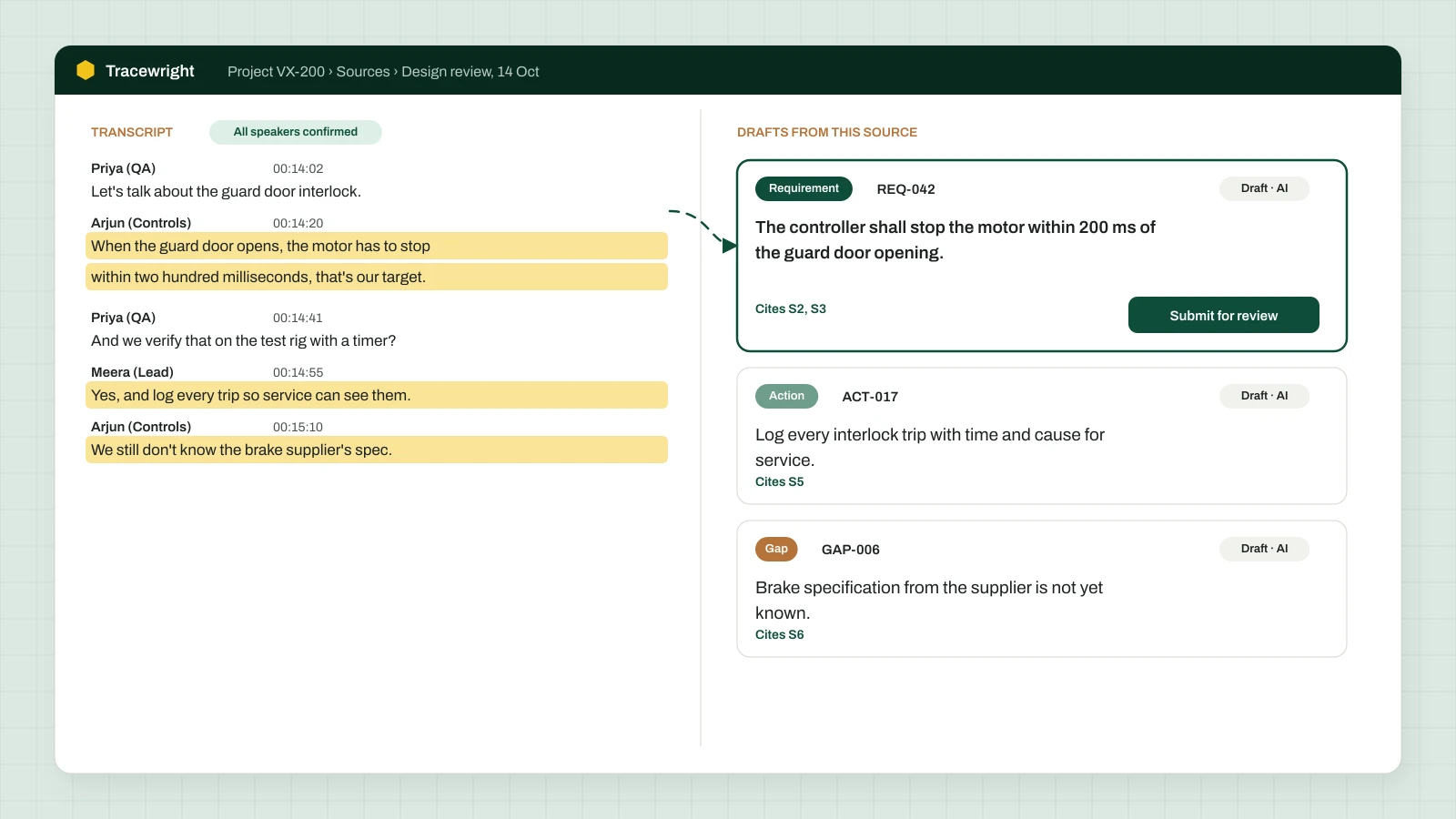
What your team works with
Illustrations of the main screens, with made-up project content.
Help & docs
Set it up, move to it, fix it
Guides written by the team that builds and supports Tracewright.
All Tracewright docs →- Get startedWhat Tracewright doesMeetings and documents become draft requirements, decisions, gaps and hazards, each traced to its source, then reviewed, signed and released as a baseline. Agents draft; people decide.
- Get startedQuick start: your first projectStart a design project in six steps, add your first meeting or document, and review the drafts it produces.
- Get startedRoles and who can do whatApp roles, project duties, and the separation of duties that keeps reviews honest.
- UseAdd meetings, documents and emailsEvery way to bring a source into a project, and how retention and consent work.
- UseRecord meetingsRecord in the browser, with the browser extension or the desktop app; file the recording, confirm who spoke and get drafts.
- UseReview and approve records, day to dayA reviewer's and approver's routine, from My queue to the signature, with the approval package.
Sign up
Sign up for Tracewright
Start with Meetings, or the full design controls. Tell us your domain and the tools you use, and we'll set up a workspace or walk you through it with your own project.
Read the docsTell us who you are and what you'll use it for. We'll set up your access and send you the details.