Live Warehouse Visibility.
Smarter Indoor Navigation.
Know exactly where your tagged forklifts, pallets, and selected assets are on your warehouse floor.
Indoor UWB Positioning uses Ultra-Wideband technology to track tagged assets, display their locations on a live floor map, record movement history, and provide directional guidance from a forklift to its target pallet.
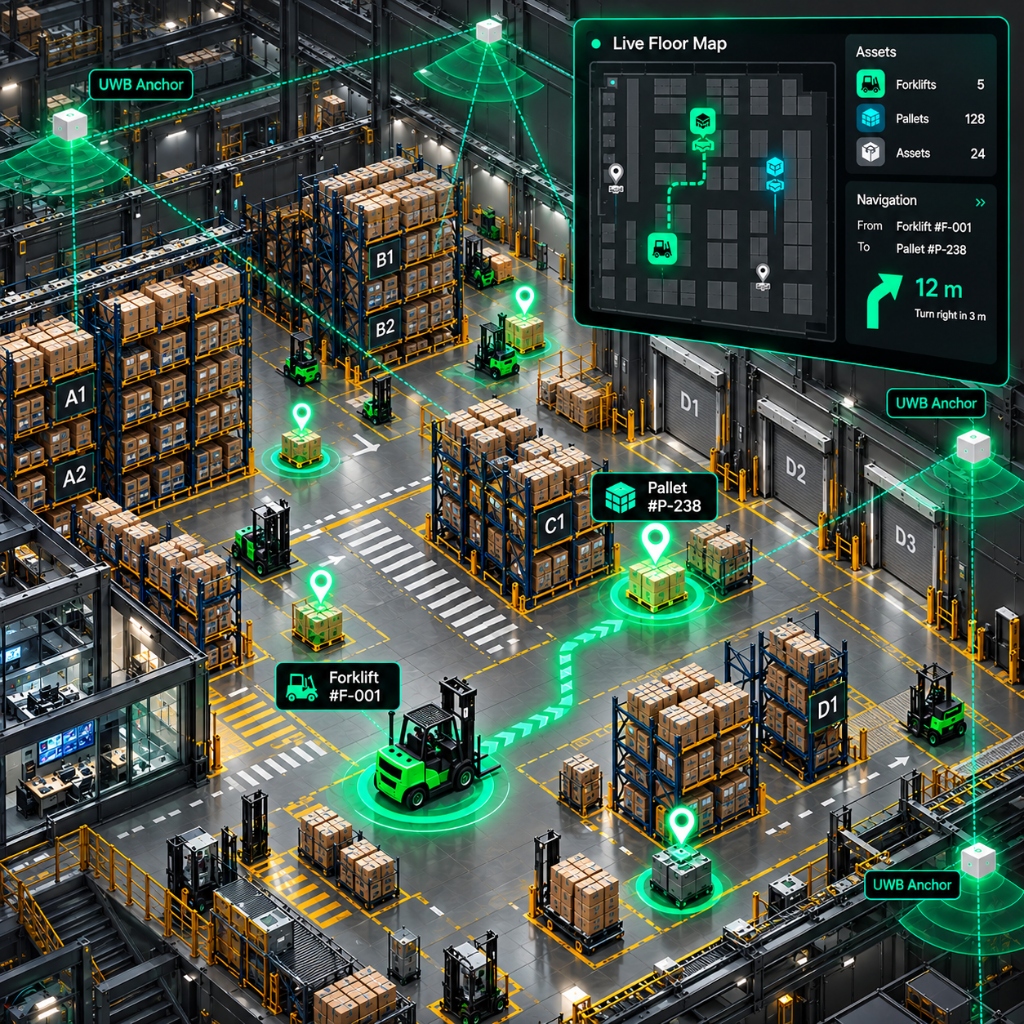
Know Where Your Assets Are. See Where They Move.
Managing forklifts, pallets, and other assets inside a warehouse requires clear visibility into their locations and movements.
Indoor UWB Positioning provides a connected solution that turns distance measurements from fixed Ultra-Wideband anchors into live asset positions on a mapped warehouse floor.
By placing UWB tags on forklifts, pallets, and selected assets, the system identifies their positions and displays them through a live operator interface.
It also maintains time-stamped movement records and generates directional guidance to help a tagged forklift approach its designated pallet.
The result is a clearer view of warehouse activity, supported by location data rather than manual position updates.
What the System Delivers
Live positioning of tagged forklifts and pallets
Asset locations displayed on a warehouse floor plan
Forklift-to-pallet directional guidance
Time-stamped asset movement history
Centralized operator visibility
Service failure notifications
From Distance Measurements to Live Warehouse Navigation
The system combines UWB anchors, asset-mounted tags, positioning software, and a live floor-map interface to provide location information and directional guidance.
Sense
Fixed Ultra-Wideband anchors installed at surveyed locations collect distance measurements from tags attached to forklifts, pallets, and other configured assets.
Locate
Using at least three valid distance measurements, the positioning software calculates the tag's location on the warehouse floor.
Show
The calculated locations appear on a live digital warehouse floor plan. Operators can identify forklifts, pallets, and other configured assets through recognizable markers rather than anonymous location points.
Record
Every accepted position is stored with a timestamp in a time-series database. This creates a movement history that can be reviewed, played back, and used for operational reporting.
Guide
When both the forklift and its target pallet have valid positions, the system calculates the direction from the forklift toward the pallet. This heading is published to a compatible guidance device to support movement toward the designated load.
Everything You Need for Connected Indoor Asset Visibility
1. Live Indoor Positioning
Track the calculated locations of configured UWB-tagged assets on a mapped warehouse floor.
2. Interactive Warehouse Floor Map
View forklifts, pallets, and selected assets on the actual floor layout, with anchor locations marked for reference.
3. Forklift-to-Pallet Guidance
Calculate and publish a directional heading from a tagged forklift to its designated pallet when both locations are available.
4. Asset Movement History
Maintain time-stamped positioning records for reviewing historical asset movements, playback, and reporting.
5. Asset Identification
Distinguish forklifts, pallets, and other configured assets through recognizable markers in the live operator view.
6. Secure Cloud Data Transmission
Transmitting positioning measurements through secure cloud transmission.
7. Automated Service Alerts
The system sends email alerts to the operations team when an error occurs.
Built for Warehouse and Indoor Logistics Operations
Indoor UWB Positioning is designed for facilities that need live visibility of tagged vehicles and loads within a known, mapped floor area.
Warehouse Operations Teams
Monitor configured forklifts, pallets, and selected assets through a live warehouse floor map.
Indoor Logistics Teams
Use location information and forklift-to-pallet guidance to support internal material-handling operations.
Material Handling Operations
Provide compatible guidance devices with directional information toward designated loads.
Warehouse Supervisors
Review current asset locations and historical movements to support operational oversight.
Facility Operations Teams
Monitor positioning-service availability and receive notifications when critical connectivity or storage processes fail.
From Site Survey to Live Positioning
Indoor UWB Positioning is configured around the physical layout and operational requirements of each deployment site.
Survey the Site
Assess the warehouse layout and determine suitable UWB anchor locations.
Install Anchors and Tags
Install anchors at surveyed coordinates and attach UWB tags to the designated forklift, pallet, and other selected assets.
Configure the Floor Map
Set up the warehouse floor plan, scale, anchor coordinates, and tag assignments in the positioning application.
Activate Live Monitoring
Connect the field devices and open the live operator view to monitor calculated asset positions.
Common Questions About Indoor UWB Positioning
What is Indoor UWB Positioning?
Indoor UWB Positioning is a warehouse location-tracking solution that uses Ultra-Wideband anchors and asset-mounted tags to calculate positions and display them on a live floor map.
How does the system determine an asset's location?
Fixed UWB anchors provide distance measurements from configured tags. Using at least three valid measurements, the software calculates an asset's position.
Can the system track forklifts and pallets simultaneously?
Yes. The current application supports configured tags attached to forklifts, pallets, and selected assets.
Does the system provide forklift navigation?
The system calculates and publishes a directional heading from a tagged forklift to its designated pallet. A compatible guidance device can use that heading to support navigation.
Can operators view historical asset movements?
Yes. Accepted positioning records are stored with timestamps and can be used for playback, review, and reporting.
What happens if a positioning service fails?
The system sends email alerts to the operations team when an error occurs.
Does the system support multiple warehouses?
The documented application is configured for one mapped indoor floor per deployment. A multi-site web portal is not part of the currently documented capability.
What is required before installation?
A site survey is needed to confirm anchor placement, floor-plan scale, tag assignments, and compatibility with the intended guidance device.
Bring Live Positioning to Your Warehouse Floor.
Track tagged forklifts and pallets, monitor their movements, review historical positions, and support forklift-to-pallet guidance through one connected indoor positioning solution.
Discover how Indoor UWB Positioning can support visibility and material-handling operations at your facility.